Appendix H: Expressing Ideas Digitally
“We thought sampling was just another way of arranging sounds. Just like a musician would take the sounds off of an instrument and arrange them their own particular way.” — [Chuck D](https://en.wikipedia.org/wiki/ChuckD), Public Enemy[1]_
This book was written with the tools it teaches. This appendix is about why, and how you can do the same — not just for a book, but for any structured idea you want to put into the world.
Beyond the Press
Gutenberg gave us movable type. For five hundred years, expressing an idea to a large audience meant access to a press, a publisher, a distribution chain, and capital. Project Gutenberg digitized the output of that era — tens of thousands of books, free, online. That was the first revolution: making the reading of ideas free.
We are in the second revolution: making the expression of ideas free. Not just the reading. The writing, the illustrating, the structuring, the publishing, the distributing. Every step that used to require a professional or a budget now has a free, open tool. Plain-text markup — Djot, a refinement of CommonMark — for writing. AI agents for illustration. Open standards for packaging. The internet for distribution. Creative Commons for licensing.
This book is not a PDF of a printed book. It is not a word processor document exported to a file format. It is a structured digital artifact — semantic content, embedded metadata, accessibility baked in, licensing embedded in every file — designed from the ground up to be read on any device, forked by any community, and built by one person with no budget.
The format is ePub. But the format is not the point. The point is that the best technological concepts we have — open standards, semantic markup, embedded metadata, accessible design, reproducible builds, permissive licensing — are available to anyone with a text editor and a terminal. You do not need a publisher. You do not need a press. You need an idea and the willingness to specify it clearly.
This appendix is what we learned about doing that.
Why ePub
ePub is not a book format. It is a container for structured ideas.
An ePub file is a ZIP archive containing XHTML documents, a CSS stylesheet, images with embedded metadata, a machine-readable manifest, a navigation document, and rights information. It is, technically, a small self-contained website in a box. Every ePub reader — Apple Books, Kindle (via conversion), Kobo, Google Play Books, Calibre — is a specialized browser.
The critical property: ePub is reflowable. The reader controls the font, the margins, the background color, the text size. You do not control the page. This is a feature, not a limitation. It means your content must be structured semantically — headings, paragraphs, asides, figures — rather than visually. A heading is a heading because it is marked as one, not because it is 18-point bold. This structure is what makes the content accessible, transformable, and durable.
Everything downstream — web pages, PDFs, print layouts, audiobook scripts — can be derived from a well-structured ePub. The reverse is not true. A book designed for fixed pages will fight every reflowable format. Start reflowable. Derive everything else.
Plain Text as Source
The manuscript is Djot — plain text with minimal formatting marks, from the CommonMark family. Not a word processor. Not a proprietary format. Not a platform.
## Chapter Title

This is a paragraph. *This is bold.* _This is italic._

::: science
This is a sidebar with a citation.[^1]
:::


[^1]: Author (Year). "Title." _Journal_, vol, pages.
Djot compiles to XHTML. XHTML is what ePub chapters are. The pipeline is deterministic — the same input always produces the same output. The manuscript is version-controlled in Git. Every change is tracked. Every version is recoverable. Collaboration is branching, merging, and pull requests — the same tools that build software.
Your word processor saves a binary file that you cannot diff, cannot merge, and cannot inspect without the application that created it. Your Djot file is a text file that will be readable in fifty years by any tool that can open a file.
Structure as Metadata
Every chapter is a file. Every file carries its own metadata:
---
title: "Chapter Title"
part: 2
order: 3
status: "final"
---
The build pipeline reads the frontmatter, sorts by part and order, and assembles the ePub. Reorder chapters by changing a number. Add a chapter by adding a file. Remove a chapter by deleting a file. The filesystem is the table of contents. There is no separate document to maintain.
This is the same principle the book teaches in Strategy 0: the specification is the work. The metadata is not documentation about the book. It is the book’s structure, expressed as data, executed by a build system.
Art Direction as Specification
Every illustration is specified where it appears. The chapter carries an inline reference:
[eob-annotated]{.art}
and next to the chapter lives a sidecar file — eob-annotated.art.md — whose frontmatter holds the image’s format, size, and alt text, and whose body is the production brief for the illustrator. (This appendix reuses the same illustration as the Health chapter’s EOB Skill — one spec, one image, referenced from both places, the same DRY principle this section is about to describe.)
This is Strategy 0 applied to visual content. The alt field is what the reader needs to know. The brief is what the illustrator needs to produce. Both are written at the same time, by the same person, next to the text they accompany.
The sidecar is permanent. When the image is produced, the sidecar stays — it is the specification, the art direction record, the basis for revision. The sidecar is the request. The image is the result. Both live together.
That reference resolves to the figure that follows — or, until the image is produced, to a placeholder carrying the alt text and the brief. Either way the reader gets the specification doing its job:
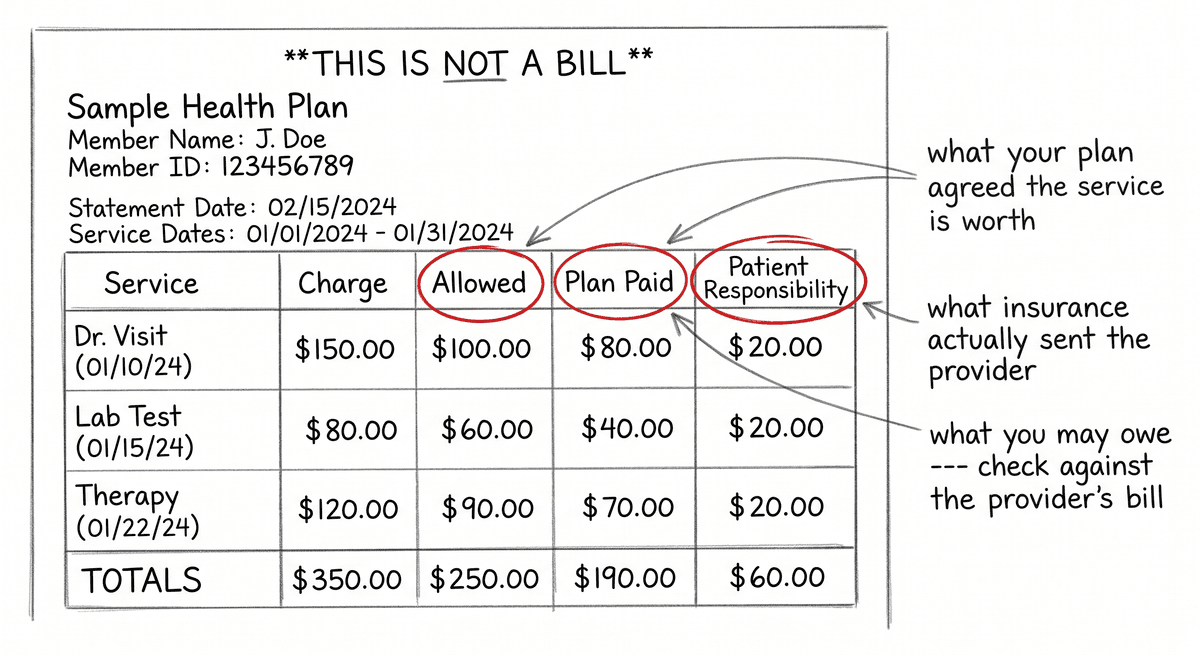
If you are using an AI agent to illustrate, your style guide is a system prompt — agentic instructions, not a reference document. The same specification interview that works for an insurance appeal works for an illustration: describe what you want precisely enough that someone who has never seen your vision can execute it correctly.
Self-Documenting Artifacts
Every image file carries its own documentation as embedded XMP metadata:
-
Iptc4xmpCore:AltTextAccessibility— the alt text, in the image itself -
dc:description— the production brief that created it -
dc:rights— the license
If the image is copied, shared, forked, or archived, its accessibility text, its provenance, and its license go with it. A PNG without metadata is an orphan — a file with no history and no context. A PNG with embedded XMP is a self-documenting artifact. It knows what it is, why it was made, and who can use it.
This is an IPTC standard. It is how professional photography has worked for decades. There is no reason amateur digital publishing should have less metadata discipline than a wire service.
Accessibility as Architecture
Accessibility is not a compliance checkbox at the end of a project. It is a structural decision at the beginning.
Write alt text when you write the art brief. The person who specified the image is the person best positioned to describe what it communicates. “An illustration” is not alt text. “A hand-drawn EOB form with three fields circled: Amount Billed, Allowed Amount, and Patient Responsibility” is alt text. The first version tells the screen reader nothing. The second version makes the image unnecessary — the reader knows what it shows and what it means without seeing it.
Use semantic HTML elements — <aside> for sidebars, <figure> for illustrations, <section> for chapters — not <div> with class names. Screen readers and ePub reading systems use the element type to navigate. A <div class="sidebar"> is invisible to assistive technology. An <aside role="doc-sidebar"> is a landmark.
Support dark mode. Inline graphics need transparent backgrounds so they adapt to any background color. The CSS prefers-color-scheme: dark media query handles the rest. Test every graphic against both light and dark backgrounds. A generation of readers uses dark mode by default. If your illustrations break in dark mode, they break for a significant fraction of your audience.
The License Is the Distribution
This book is CC BY-SA 4.0. That is not a legal footnote. It is the distribution strategy.
A permissively licensed ePub is a seed. Anyone can take it, translate it, adapt it for a specific community, build a workshop from it, turn it into a video series, or improve it and release the improvement. The license is embedded in the ePub metadata. The license is embedded in every image file. The license is on the cover in the author’s own handwriting. There is no ambiguity.
If you are writing a guide for a community that needs it, license it so the community can own it. CC BY-SA means: use it, change it, share it, but keep it open. The ideas spread further when the container is free.
The Build
The entire book compiles from Djot source to ePub with a single command:
npm run build
The pipeline is a series of transformations — parse the Djot, transform callout blocks into semantic asides, resolve art briefs, collect footnotes into chapter endnotes, generate XHTML, assemble the ZIP. Each step is a plugin. Each plugin does one thing. The output is a single .epub file.
This is the same principle as the book’s content: the specification is the work, and the machine executes the specification. You do not manually lay out pages. You do not manually number chapters. You do not manually copy images into a folder structure. You write content, specify metadata, and run the build. The build is deterministic — the same source always produces the same output.
If this sounds like software engineering, it is. The best technological concepts for expressing ideas digitally are the same ones we use to build software: version control, semantic structure, automated builds, metadata standards, and open formats. The publishing industry spent decades reinventing these concepts poorly. The tools are here. Use them.
What We Learned
Start the color palette before the first illustration. Every color decision deferred is a consistency problem later.
Write the illustrator instructions as agentic prompts from day one, even if you plan to illustrate by hand. The act of writing precise instructions for an agent clarifies the visual language in ways that mood boards and reference images do not.
Define your sidebar types before chapter one. Adding a new type mid-project means auditing every existing chapter. Six is enough. Four is fine. More than eight is a taxonomy, not a tool.
Standardize your citation format before you have twenty different styles across forty chapters.
Embed the rights metadata everywhere — in the ePub manifest, in every image file, on the cover. Make it impossible to separate the content from its license.
Use order: -1 in frontmatter for content that precedes the main sequence. The sort is numeric. Negative numbers sort first. Do not renumber the entire manuscript to insert an epigraph.
ePub will evolve. Djot will be replaced. The standards we used to build this book are tools — useful today, disposable tomorrow, exactly like the AI agents the book teaches you to use. The formats are never the point. The ideas are the point. Use the best tools available right now to express them as clearly and accessibly as you can. When better tools arrive, use those instead. The press is in your pocket. What you print on it is yours.
-
[1] The copyright panic, the “it’s not real art” panic, the “it’s theft” panic — all of it happened in 1991, about sampling. See the Grand Upright Music, Ltd. v. Warner Bros. Records Inc. decision that changed everything.↩