Computer & Web
Computer & Web
“I love new mediums… I think mediums can turn you on, they can excite you: they always let you do something in a different way, even if you take the same subject.” — [David Hockney](https://en.wikipedia.org/wiki/DavidHockney), on painting with an iPad at age 73_
The internet was built on a promise: anyone could publish, anyone could read, anyone could connect — no permission required. For a decade or so, it delivered. Then the platforms arrived, and the open web was enclosed like common land in the English countryside — fenced, monetized, and rented back to the people who built it. The billionaire class maintained their own domains, their own servers, their own archives. Everyone else got a profile page on someone else’s property, governed by someone else’s algorithm, deletable at someone else’s discretion. The Skills that follow are about reclaiming what was always yours: your words, your identity, and your corner of the web.
Your Computer

Before the web, before the website, before the blog — there is the machine on the table. The billionaire class has always had someone to choose, configure, and maintain their technology. An IT department. A “tech guy.” A personal assistant who handled the setup and called the help desk. Everyone else got a shrink-wrapped box, a quick-start guide written for an imagined user who already understood everything, and the unspoken message that if you couldn’t figure it out, the problem was you. It was never you. The problem was a consumer electronics industry that made products for a technical audience and marketed them to everyone. Your Agent can close that gap — not by making you technical, but by translating the technical into the specific.
WB-1: Learning Any App or Digital Skill

Strategy: Decode + Navigate See also: WB-7: Write in CommonMark, the Language of AI (a specific digital skill) My Man Jeeves: One might observe that software manuals expired in the early 2000s and were replaced by nothing of consequence. YouTube tutorials proceed on the assumption that one already possesses the vocabulary. Official documentation is composed for developers. The result, if one may say so, is a population that employs approximately 10% of the tools for which it pays — not through any incapacity to master the remaining 90%, but because no one has undertaken to explain it at the level where the learner actually stands, without judgment, for as long as the matter requires. One’s Agent will. The Spec:
I want to learn [app or skill: Photoshop / Excel / video editing /
graphic design basics / email management / a new phone feature /
how to use my smart home devices / digital drawing / etc.].
My current level: [never used it / tried it once and got lost /
use it for basic things but want to do more / switching from
a different tool]
My goal: [what I specifically want to be able to do — not
“learn Photoshop” but “edit my photos so they look better
before I post them” or “make a flyer for my community event”]
Please:
1. Tell me the three things to learn first that will cover
80% of what I need
2. Walk me through each one step by step, with the exact
buttons and menu items to click
3. Give me a practice exercise I can do in 15 minutes
4. Tell me what most tutorials waste time on that I can skip
What to do with the Output: Do the practice exercise. Not tomorrow — now. The gap between “I should learn this” and “I know this” is one fifteen-minute session where you actually click the buttons. Your Agent can see your screen if you use the desktop version of most AI tools — paste a screenshot and say “I’m stuck here, what do I click next?” That is the most underused feature in AI right now.
Science Note: The digital skills gap tracks education, not generation — the OECD’s Survey of Adult Skills (2024) found a 42-point gap in adaptive problem-solving linked to parental education, and Kirschner & De Bruyckere (2017) called the “digital native” a myth, a conclusion Nature endorsed. The real divide is not access to devices but access to patient instruction.[1]
WB-2: Automation and Script Writing

Strategy: Create + Navigate See also: WB-5: Build a Website, Own Your Corner of the Internet (for web-scale projects), WB-7: Write in CommonMark, the Language of AI My Man Jeeves: Programming formerly required a computer science degree, or at minimum the temperament that finds pleasure in reading documentation for its own sake. It would appear that this is no longer the case. One’s Agent is capable of writing small programs — scripts — that attend to the tedious portions of one’s digital life: renaming 500 photographs, sorting a spreadsheet, converting files from one format to another, retrieving a price from a website each morning. One need not learn to code. One need only learn to describe what one wishes the code to do. Which is — and this, if one may venture the observation, is the point of this entire book — specification. The Spec:
I have a repetitive task I want to automate:
[describe the task in plain language — e.g., “every week I download
a CSV from my bank, open it in Excel, and manually categorize
each transaction” or “I have 300 photos with meaningless filenames
and I want to rename them by date” or “I want to be notified
when a product drops below a certain price”]
I am not a programmer. I have never written code before.
Please:
1. Tell me if this can be automated with a simple script
2. Write the script for me, in the simplest language
that will work
3. Explain how to run it — assume I don’t know what
a terminal is
4. Tell me what could go wrong and how to fix it
What to do with the Output: Run the script on a small test set first — ten files, not three hundred. Read the explanation of what the script does even if you don’t understand every line. You are not trying to become a programmer. You are trying to stop doing the same tedious task every week. That is a legitimate use of the technology, and it is the one that saves the most time for the most people. Your Agent will default to writing scripts in Python, which requires installation — if you want something that runs without installing anything, say “Write this as a script I can run in my web browser’s console” (JavaScript) or “Write this as a spreadsheet formula.” The fewer dependencies, the fewer things that can break.
The term for this is vibe coding — describing what you want in plain language and letting the AI write the code. It is not a shortcut or a cheat. It is specification literacy applied to software. The spec is the program. The code is just the translation.
Science Note: End-user programming research (Scaffidi et al., 2005) estimated that by 2012 there would be 55 million “end-user programmers” in the United States — people who write scripts, macros, and formulas as part of their non-programming jobs — compared to 3 million professional developers. AI-assisted code generation does not create a new category; it lowers the barrier to one that already existed.[3]
Science Note: Andrej Karpathy coined the term vibe coding in February 2025 — “fully give in to the vibes, embrace exponentials, and forget that the code even exists.” The idea is older — end-user development and natural language programming have been research areas for decades — but AI is now good enough that “describe what you want” produces working code for simple tasks. The success rate drops sharply as ambiguity in the spec increases, which is the same pattern as everything else in this book.[4]
Your Voice Online
WB-3: Customize Your Chat Interface
Strategy: Specify See also: WB-4: Learn to Work Better with AI Agents, Chapter 2: Your First Three Conversations, Chapter 4: How to Ask for What You Actually Want My Man Jeeves: When the billionaire class engaged a personal assistant, the first week served as an audition — not of competence, but of fit. Do they send bullet points or paragraphs? Do they say “Mr. Arnault” or “Bernard”? Do they flag difficulties immediately or reserve them for the morning briefing? The assistant who survived the probationary period was the one who matched the principal’s communication rhythm without requiring instruction twice. One’s Agent possesses the same capacity for customization — and unlike a human assistant, it is not in the least disposed to take the feedback personally. The difference, one might note, is that the billionaire invested in a three-month trial period. One receives a settings panel and ten minutes. The Spec:
I want to set up my AI assistant’s profile so every conversation
starts with it already knowing who I am and how I communicate.

Here is what I want it to know:
— My name: [your name]
— How to address me: [first name / nickname / “Dr. [last name]” /
something fun like “captain” or “boss”]
— Response length I prefer: [short — a few sentences max /
detailed with examples / depends on the topic, ask me]
— Tone I prefer: [casual and conversational / professional /
dry and direct / warm but not bubbly]
— Topics I ask about most: [health / money / writing / home
repair / work / parenting / cooking / all of the above]
— Things I never want: [corporate jargon / emoji / “Great
question!” openers / unsolicited disclaimers / being talked
to like a child / bullet points for everything]

Please draft custom instructions I can paste into my settings.
Keep it under 200 words — short enough that I will actually
read it before I hit Save.
What to do with the Output: Copy the instructions your Agent drafted. Open your settings. Paste them in. Start a new conversation and ask something simple — the difference is immediate. Then adjust. Too formal? Say so. Too verbose? Cut a line. The best custom instructions are rewritten three or four times in the first week as you notice what bothers you. This is not a one-time setup. It is a calibration process — the same one the billionaire class ran with a human, compressed into a text box and a backspace key.
Start with three lines in whichever settings panel you’re using: your name, your preferred response length, and one thing you never want. You can always add more — overloaded custom instructions get ignored the same way overloaded employee handbooks do.
WB-4: Learn to Work Better with AI Agents
Strategy: Specify + Research See also: Strategy 0: Specify (the full specification interview method), Chapter 4: How to Ask for What You Actually Want, WB-7: Write in CommonMark, the Language of AI My Man Jeeves: This is the Skill that instructs one in the use of the tool upon which every other Skill depends. If the book may be likened to a workshop, this would be the safety orientation for the power tools. The billionaire class had no occasion to acquire this practice — they already maintained a staff that translated vague instructions into precise tasks. The chief of staff, the executive assistant, the law clerk — these are, in essence, human specification interfaces. One is learning the same practice, applied to a rather different kind of assistant. The Spec:
I want to get better at working with AI Agents — not just
using them, but understanding how to get consistently useful
results. I have been using [Claude / ChatGPT / Gemini / Copilot]
for [how long] and my experience so far is [describe honestly:
sometimes useful, sometimes useless / great for simple things
but fails on complex ones / I don’t know what to ask it / etc.].

Please help me understand:
1. What is the single most important thing that separates
a good AI conversation from a bad one?
2. What are the three most common mistakes people make
when talking to an AI Agent?
3. How do I know when the AI is giving me a good answer
versus a confident-sounding bad one?
4. What should I never trust it for without verification?
5. Give me a practice exercise: a real-world task I can try
right now that will teach me the most about how this works
What to do with the Output: Do the exercise. Then do the same exercise again, but badly — give the Agent a vague, context-free prompt and compare the results. The difference between the two outputs is specification literacy made visible. You will not need to read a book about it after that. You will have felt it.
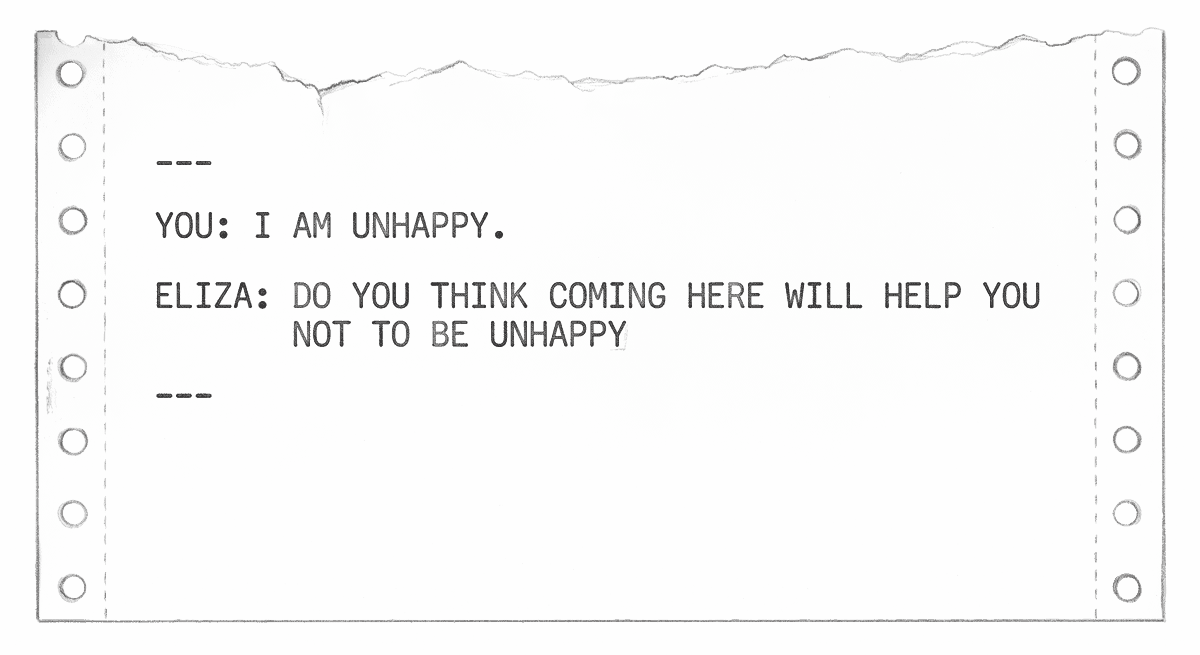
This Skill is recursive by design. You are using your Agent to learn how to use your Agent. The specification interview loop — describe your situation, answer the clarifying questions, review the proposed spec, correct what is wrong — is the same whether you are asking about insurance or asking about the tool itself. The practice is the practice. It transfers to everything.
The skill extends beyond wording. A standardized spec format — a template someone has already refined for the task, like the ones throughout this Field Guide — produces better output than a request improvised from scratch. Part of working well with Agents is collecting the formats that work, and knowing which apps your Agent lives inside, since that determines where your specs can travel.
It includes the output, too — not only what your Agent says but the form in which it hands it back. A chat reply is Markdown by default: plain text with a handful of symbols, the lingua franca your Agent shares with every other tool (see WB-7), and the right choice for anything you will keep editing or pass back and forth. But when the result’s whole job is to be looked at — a report, a side-by-side comparison, a packing list, a small budget calculator — ask for it as a self-contained web page: “give me this as one HTML file I can open in my browser.” A web page can do things a chat reply cannot — like sortable tables, interactive checklists, or fields that update totals as you type. Even when it is just text, it arrives laid out and finished: it opens with a double-click on any device, prints cleanly, and travels as a single file. The trade-off is that HTML is awkward to edit by hand, so it is the last step, not the working draft. Markdown for the conversation; HTML for the thing you walk away with.
The same split runs through data and documents. Your Agent reads and writes CSV — the spreadsheet’s plain-text form — as easily as it reads Markdown: hand it a messy bank export and it will sort, dedupe, and total it in seconds. But almost nobody wants a CSV at the end. They want an Excel workbook, with formatting and formulas and more than one sheet — so ask for .xlsx. A letter that has to land in someone’s Word: ask for .docx. Something you will sign, submit, or file away unchanged: ask for PDF. One caveat: tools differ in whether they can hand you the finished file or only its contents — Claude and ChatGPT can usually generate the file itself; if yours cannot, take the content it gives you and do that last conversion yourself, or ask it how. Plain text — Markdown, CSV — to think and work in; a real file in the format your recipient expects for the thing you deliver.
Your Place on the Web
WB-5: Build a Website, Own Your Corner of the Internet

Strategy: Create + Navigate See also: WB-7: Write in CommonMark, the Language of AI (for writing your content), WB-8: Blogging and Journaling My Man Jeeves: The billionaire class has always maintained a web presence managed by professionals. The remainder of the population received Facebook pages and LinkedIn profiles — land one rents on platforms that may alter the terms, throttle the reach, or cause the content to vanish at any moment. Owning one’s own website is the digital equivalent of owning one’s home rather than renting it. It has always been possible. It has not, until recently, been this straightforward. The IndieWeb is the movement that holds a simple principle: publish on one’s own site first, syndicate to the platforms second, and never lose one’s words because a company pivoted. One’s Agent can build the site. The Spec:
I want to build my own personal website. I have never done this before.
I want it to be simple, fast, and mine — not hosted on someone else’s
platform where they control what I can say and who sees it.
Please walk me through the process from the beginning:
1. What do I need to get started? (domain, hosting, tools)
2. What will my site look like when it’s done?
3. How do I put content on it?
4. How do I make it findable on the web?
5. What will it cost me, and what should I never pay for?
6. What is POSSE (Publish on your Own Site, Syndicate Elsewhere)
and how do I set it up?
7. How do conversations work across independent websites?
Keep it simple. I want something I can maintain myself.
What to do with the Output: Follow the steps. Your first site does not have to be perfect. It has to exist. You can improve it every week for the rest of your life — and unlike a social media profile, every improvement accrues to something you own. A static site (plain HTML files, no database, no server-side code) is the simplest, fastest, cheapest, and most durable option. It is also the greenest — a static site uses a fraction of the energy of a WordPress installation because there is nothing to compute, only files to serve.
Science Note: The environmental math backs this up — data centers account for roughly 1–1.5% of global electricity use (IEA, 2024), and a static site served from a green host produces orders of magnitude less carbon per page view than a dynamic site that spins up computation for every visitor. The Green Web Foundation maintains a directory of verified green hosts.[7]
A static site on Cloudflare Pages or Netlify starts at free; a custom domain costs $10–15 a year — less than one month of most streaming subscriptions. That is the total cost of owning your corner of the web.
WB-6: Stop Doomscrolling the Algorithmic Feed

Strategy: Research + Navigate See also: Li-11: Escaping Social Media (for reducing compulsive consumption), WB-5: Build a Website, Own Your Corner of the Internet My Man Jeeves: Before the algorithm, there existed RSS — a protocol that permitted one to subscribe to any website and receive its updates in a single reader, in chronological order, with no advertisements, no ranking, no engagement optimization, and no company determining what one should see next. RSS, one feels compelled to mention, still works. It never stopped working. The platforms merely ceased to promote it, as a protocol that places control in the hands of the user does not, regrettably, generate advertising revenue. One’s Agent can help one set it up. The Spec:
I want to read the web on my own terms — without algorithms
deciding what I see and without social media feeds.
My interests: [list topics, publications, or writers you follow]
Please help me:
1. Understand what RSS is and how it works — in plain language
2. Recommend a feed reader that’s simple to use
3. Find the RSS feeds for the websites and writers I already follow
4. Suggest how to discover new sources outside of
social media recommendations
5. Show me how to use my AI Agent to curate and summarize
what I’m reading — a daily briefing that I control
What to do with the Output: Set up a feed reader and add ten sources. That is your starting library. Within a week, you will notice a change: you are reading what you chose, not what an algorithm chose for you. The difference in signal quality — and in how you feel afterward — is immediate and measurable.
Common reading Expert Role specs:
Act as my research librarian. Here are the topics I care about:
[list]. Find me the best independent sources — blogs, newsletters,
journals — that cover these topics with depth, not engagement bait.
Give me their RSS feeds if they have them.
I subscribe to [X] feeds and I can’t keep up. Help me build
a system: which feeds should I read daily, which weekly,
and which should you summarize for me? Prioritize original
reporting over aggregation.
Escaping the algorithm starts with picking a reader.
WB-7: Write in CommonMark, the Language of AI
Strategy: Decode + Draft See also: WB-5: Build a Website, Own Your Corner of the Internet, WB-8: Blogging and Journaling My Man Jeeves: CommonMark serves as the universal language of AI in much the way English serves as the universal language of air traffic control — not because it is the finest available, but because all parties agreed upon it and it functions reliably. It is plain text with a modest number of symbols that carry meaning. One can acquire the entire language in ten minutes. This book was written in Djot, a related format created by the same author — but that is a digression. One’s Agent thinks in CommonMark. When one writes in CommonMark, one is writing in the lingua franca of every AI system on the market — which is to say, one’s Agent can process, format, and transform one’s writing with fewer tokens and greater precision than any other format permits. The Spec:
I want to learn CommonMark so I can write content for my website
and communicate more effectively with my AI Agent.
I have never used any kind of markup language before.
Please teach me the basics I need to write a blog post:
headings, paragraphs, links, images, bold, italic, lists, and quotes.
Show me examples I can copy and modify.
Then show me the one thing that makes CommonMark more powerful
than any word processor: links.
What to do with the Output: Write your first post in CommonMark. Do not worry about getting the syntax perfect — your Agent will correct you. The point is to start writing in a format that is portable, future-proof, and readable by every tool you will ever use.
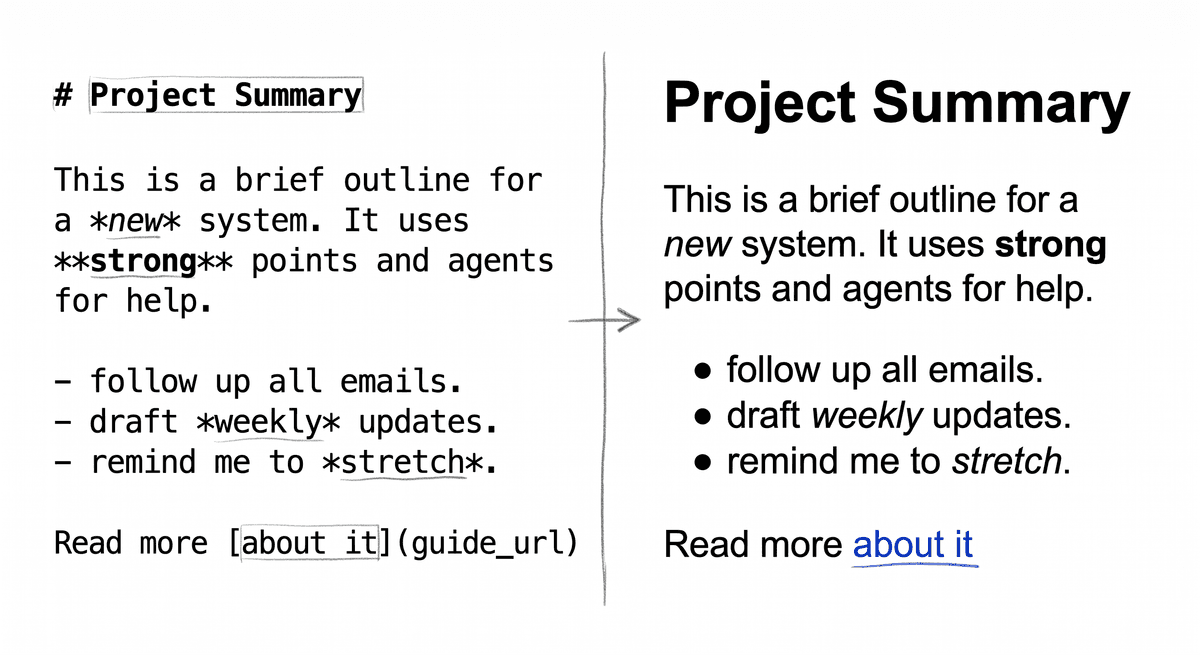
Links are the key innovation. Tim Berners-Lee built the web on a single idea: any document can reference any other document, anywhere, with a click. That is what a link is. Every link you write is a citation, a recommendation, a connection, a vote of confidence. A blog post with good links is a contribution to the web’s knowledge graph. A blog post without links is a dead end. Link generously. Before the web, citation was gatekept by publishers, editors, and academic institutions; the hyperlink democratized it — anyone can reference anyone. Ward Cunningham (inventor of the wiki) and Tim Berners-Lee both identified the link as the web’s fundamental unit of value.
WB-8: Blogging and Journaling

Strategy: Create + Draft See also: WB-7: Write in CommonMark, the Language of AI, WB-5: Build a Website, Own Your Corner of the Internet, Li-8: Wellness Coach (journaling as mental health practice) My Man Jeeves: One observes that every sitcom family maintained a room where the substantive conversations took place. For the Conners it was the kitchen table. For the Seinfelds it was the apartment. For the Simpsons it was the couch. A blog, if one may draw the parallel, is that room — except one has built it oneself, one owns the walls, and no one is in a position to cancel the programme. A journal is the same room with the door closed. Both represent acts of thinking, whether in public or in private, and both are rather more valuable than one might suppose. One’s Agent can help one start, and — should one prefer the door closed — it will not read over one’s shoulder unless asked. The Spec:
I want to start [blogging publicly / journaling privately / both].
My situation:
— What I care about: [topics, interests, professional expertise]
— What holds me back: [don’t know what to write / feel self-conscious /
don’t think anyone will read it / not sure I have anything to say /
tried before and stopped]
— What I want to get out of it: [clarify my thinking / build an audience /
document my life / professional visibility / creative outlet]
Please help me:
1. Figure out what I should write about — based on what I know,
not what’s trending
2. Develop a realistic publishing cadence I’ll actually maintain
3. Draft my first post — something I can publish today
4. Tell me honestly: does anyone actually read blogs anymore?
What to do with the Output: Publish the first post. It does not need to be good. The act of publishing — putting your thinking where others can find it — is the point. Captain’s Log, Star Date today. Every blog post is a contribution to the public record of how people think, what they know, and what they care about. Your ideas matter, even when you are echoing what others say, because your particular combination of experience and perspective is unique. That is not a platitude. It is information theory.
The format is yours to choose — writing, audio, video, or all three. Storage is cheap and hosting is free; the only scarce input is your willingness to keep making the thing.
Letters to the editor used to require an editor’s approval. Now, if you own your domain, you can speak your mind — back it up with research, or don’t. Make jokes that only one in a thousand will understand. Find that community. The one-in-a-million is the point. The internet has enough people that one-in-a-million is still a football stadium full of people who get the joke.
Science Note: Blog readership is not declining — it migrated. WordPress still powers 43% of all websites (W3Techs, 2025), and Substack reports roughly 35 million active subscriptions. And research on reflective practice (Schön, 1983, The Reflective Practitioner) shows the act of articulating experience transforms understanding whether or not anyone else ever reads it — the audience is a bonus, not the point.[11]
Licensing your work:
When you publish online, you decide how your ideas can be shared, remixed, and built upon. Creative Commons licenses let you specify this in a way that is legally enforceable and machine-readable. This book uses CC BY-SA 4.0 — anyone can share and adapt it, as long as they credit the author and share under the same terms. Ethically built AI systems respect these licenses. That is a line they must not cross. Your Agent can help you choose a license: “Explain the Creative Commons license options. I want people to share my work but I want credit. Which license should I use?”
WB-9: Preservation and Legacy
Strategy: Research + Navigate See also: WB-5: Build a Website, Own Your Corner of the Internet (owning vs. renting), H-7: Preparing for End-of-Life Conversations (the analog equivalent) My Man Jeeves: The Library of Alexandria burned. The Dead Sea Scrolls survived in clay jars for two thousand years. MySpace lost 50 million songs in a server migration. GeoCities was deleted by Yahoo in 2009. The lesson, one ventures to suggest, has been consistent across millennia: what survives is what someone deliberately chose to preserve. The internet remembers everything and nothing — everything that someone took the trouble to archive, nothing that was left on a platform that shut down, pivoted, or mislaid a database. One’s Agent can help one make the deliberate choice. The Spec:
I want to make sure my online work — writing, photos, creative
projects — survives beyond any single platform or service.
My situation: [I have years of content on social media /
I have a website I want to preserve / I want to plan
for what happens to my digital life when I’m gone /
I just want to understand how web preservation works]
Please help me:
1. Understand what Archive.org is and how to use it
to preserve my site and others I care about
2. Export and back up my content from [platforms I use]
3. Choose a domain name that will serve me for decades —
what makes a good permanent identity online?
4. Plan for digital legacy — what happens to my accounts
and content after I die?
What to do with the Output: Submit your website to the Wayback Machine today. It takes thirty seconds. Then export your content from every platform you use — most offer a data export buried in their settings. Store the exports somewhere you control. The domain you choose is your handle, your identity, the name you are known by online. Pick it as carefully as you would a pen name — it is the digital equivalent, and it can outlast you.
Science Note: Link rot is not a metaphor. Zittrain et al. (2021) found that 25% of links in New York Times articles from 1996 to 2019 are broken. The web is not permanent by default. It is permanent only by effort.[13]
Preservation isn’t just for your own work — it’s also about the people who’ll need access to what you leave behind.
WB-10: Doing Real Research with Your Agent
Strategy: Research + Decode See also: Li-13: Using Your Public and Academic Library (where the Agent’s summary ends and the primary source begins), WB-6: Stop Doomscrolling the Algorithmic Feed (the upstream version of this Skill), WB-7: Write in CommonMark, the Language of AI (for taking notes the Agent can read back), WB-1: Learning Any App or Digital Skill My Man Jeeves: A distinction of some consequence has long obtained between searching and researching. The former returns 10 links ranked by the advertising market; the latter requires one to formulate a question, locate the relevant literature, weigh the contradictory findings, and arrive at a position one can defend. The former has, since approximately 2001, been available to everyone; the latter has remained the province of those with access to a research librarian, a university subscription, and the unhurried hours in which to use them. One’s Agent does not make one a scholar. It does, however, perform the preliminary work that a graduate student would once have performed for a professor — framing the question, surveying the field, identifying the disagreements, and indicating where one ought to read next. One is then in a position to do the reading. The Spec:
I want to research [topic / question / decision] thoroughly,
not just look it up.
What I already know or believe: [your current understanding —
including where you got it]
What I need this for: [a decision / an argument / a paper /
a conversation / general understanding]
How much I want to trust the answer: [enough to act on it /
enough to quote it / enough to bet money on it]
Please:
1. Restate my question in the most precise form, and tell me
if I’m asking the wrong question
2. Survey what is actually known — distinguish settled findings
from contested ones from speculation
3. Name the strongest source for each major claim, and the
strongest source against it
4. Tell me what you are NOT sure about, and where my next
reading should go to close the gap
5. Flag anything you may have hallucinated — proper nouns,
statistics, citations, dates — so I can verify it before
I rely on it
What to do with the Output: Verify before you act. Pull at least one cited source — abstract for a journal article, primary text for a quotation, official page for a regulation — and confirm it says what your Agent said it says. Li-13 (Using Your Public and Academic Library) is the matched companion to this Skill: the Agent surfaces the claim, the library hands you the document. If you’re researching to make a decision, save the conversation, sleep on it, and ask follow-ups in the morning. Real research has a metabolism. Honor it. Treat your Agent’s research the way scholars eventually treated Wikipedia — a starting point, never an ending one. Follow the footnotes.
Calibration is a skill you can practice. Research access is not distributed as evenly as the skill is.
-
[1] OECD (2024). Survey of Adult Skills 2023. Helsper, E.J. & Eynon, R. (2010). “Digital natives: where is the evidence?” British Educational Research Journal, 36(3), 503–520. Hargittai, E. (2010). “Digital Na(t)ives? Variation in Internet Skills and Uses among Members of the ‘Net Generation’.” Sociological Inquiry, 80(1), 92–113. Kirschner, P.A. & De Bruyckere, P. (2017). “The myths of the digital native and the multitasker.” Teaching and Teacher Education, 67, 135–142.↩
-
[2] Koch, R. (1998). The 80/20 Principle. Doubleday. See also: Knowles, M.S. (1984). Andragogy in Action. Jossey-Bass.↩
-
[3] Scaffidi, C., Shaw, M., & Myers, B. (2005). “Estimating the numbers of end users and end user programmers.” 2005 IEEE Symposium on Visual Languages and Human-Centric Computing, 207–214. For the AI-era update: Weber, I. (2025). “Feasibility of AI-Assisted Programming for End-User Development.” arXiv:2512.05666 — non-programmers successfully built web applications through AI interaction, suggesting AI-assisted coding may complement or replace low-code/no-code platforms.↩
-
[4] Karpathy, A. (2025). “Vibe coding.” X post, February 2, 2025. Collins Dictionary Word of the Year, 2025.↩
-
[5] Giles, H. (1973). “Accent mobility: A model and some data.” Anthropological Linguistics, 15(2), 87–105. For the broader theory: Giles, H., Coupland, N., & Coupland, J. (1991). “Accommodation theory: Communication, context, and consequence.” In H. Giles, J. Coupland, & N. Coupland (Eds.), Contexts of Accommodation. Cambridge University Press.↩
-
[6] Ericsson, K.A., Krampe, R.T., & Tesch-Römer, C. (1993). “The role of deliberate practice in the acquisition of expert performance.” Psychological Review, 100(3), 363–406.↩
-
[7] International Energy Agency. (2024). “Data Centres and Data Transmission Networks.” IEA Tracking Report. See also The Green Web Foundation, thegreenwebfoundation.org.↩
-
[8] W3C. (2018). “ActivityPub.” W3C Recommendation, 23 January 2018. Mastodon user data from Mastodon project statistics, 2023.↩
-
[9] Bakshy, E., Messing, S., & Adamic, L.A. (2015). “Exposure to ideologically diverse news and opinion on Facebook.” Science, 348(6239), 1130–1132.↩
-
[10] Schriver, K.A. (1997). Dynamics in Document Design. John Wiley & Sons. The research on structured text and comprehension is extensive and consistent across both print and digital contexts.↩
-
[11] Schön, D.A. (1983). The Reflective Practitioner. Basic Books. Elbow, P. (1973). Writing Without Teachers. Oxford University Press.↩
-
[12] Pennebaker, J.W. & Beall, S.K. (1986). “Confronting a traumatic event: Toward an understanding of inhibition and disease.” Journal of Abnormal Psychology, 95(3), 274–281.↩
-
[13] Zittrain, J., Bowers, J., & Stanton, C. (2021). “The Paper of Record Meets an Ephemeral Web: An Examination of Linkrot and Content Drift within The New York Times.” SSRN. On the Supreme Court and legal citations: Zittrain, J., Albert, K., & Lessig, L. (2014). “Perma: Scoping and Addressing the Problem of Link and Reference Rot in Legal Citations.” Harvard Law Review Forum, 127. See also Lepore, J. (2015). “The Cobweb.” The New Yorker.↩
-
[14] Internet Archive. archive.org. Founded 1996 by Brewster Kahle. As of 2024, the Wayback Machine contains over 835 billion archived web pages.↩
-
[15] Tetlock, P.E. & Gardner, D. (2015). Superforecasting: The Art and Science of Prediction. Crown. See also Kahneman, D. & Klein, G. (2009). “Conditions for Intuitive Expertise: A Failure to Disagree.” American Psychologist, 64(6), 515–526.↩